
Employment Status and Position: Positions of Teachers
The Positions of Teachers page details counts of employed candidates by source and position held over a period of years. By reviewing this data, school systems can identify trends across positions, address staffing gaps, and plan for future recruitment needs.
Navigate to the TalentED Dashboards
-
Select “TalentED Dashboards” from the Apps menu.
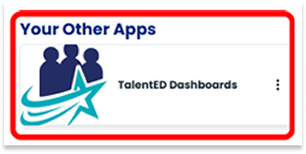
-
Select “Employment Status and Summary” from the dashboard Overview list.
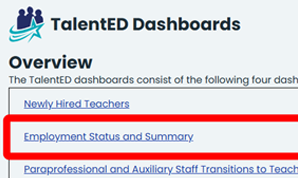
-
You may also select a dashboard from the blue margin menu.
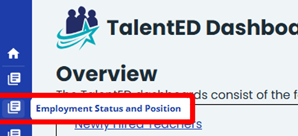
-
Select “Positions of Teachers” from the Employment Status and Summary Dashboard to view data for positions held from 1 to 5 years since a teacher was hired by a Texas public school system.

Filter Positions of Teacher Data
-
Use the Filter Selection Panel to explore Positions of Teachers data. You will be able to filter data according to:
- Hire Year
- Source
- Certification at Hire
- Years of Teaching Exp. at Hire
- Campus Level at Hire
- Campus at Hire
- Prog./Pop. Served at Hire
- EPP Route
- EPP
- Teacher Race/Ethnicity
Use the top filter panel, “Years Since Hire as a Teacher in this LEA” to focus on number of years:
- 1 Year
- 2 Years
- 3 Years
- 4 years
- 5 Years

-
Click the arrow icon on any filter in the Selection Panel to view a list of options for viewing Positions of Teachers data:
- Click the box(es) next to the options you want to view. Multiple boxes can be selected at one time. You can also click “Select all”.
- To clear a selection, uncheck the checkbox or click the eraser icon to clear all the checkboxes in that filter.
- To start over, you can click the “Reset All Filters” button. This will clear all selections that have been made in the Filter Selection Panel.
Click a year tab in the “Years Since Hire as a Teacher in this LEA” to focus on a number of years.

-
Hover the cursor over the “information icon” to view a detailed description and information about that filter.

View Positions Held After Years Since Hire as a Teacher in a LEA
-
The visualization under the Positions of Teachers Tab is titled “Positions Held After [Number of Years].” The bar graph indicates the count by position of newly hired individuals. Use the filters along the left-hand side and top to dynamically change the bar graph’s view.

-
Hover the cursor over a section of the bar graph to view detailed information about the data highlighted.
